TIG Welding Carbon Steel - Controlling Heat Input, Travel speed, and Arc Length
Arc length video

Heat input video
Go to Main Index page for TIG Welding Carbon steel Basics
If your carbon steel welds are warping, overheating, or looking scaly, chances are your heat input is too high.
One of the biggest advantages of TIG welding is precision — but without heat management and control, that precision doesn’t help much. In this article, we’ll break down what “heat input” really means, how to manage it, and when to back off to keep your welds flat, clean, and distortion-free.
🔥 What is heat input, and why does it matter?
Heat input in welding is a combination of:
- Amperage (current from your machine)
- Travel speed (how fast you move the arc)
- Arc length (how far your tungsten is from the puddle affects voltage)
High heat input = more energy into the metal = more distortion, more grain growth, more oxidation.
But high heat input involves more than just amperage.
Travel speed is one of the biggest determining factors of heat input!!!
In fact too slow a travel speed even at low amperage can have a high heat input.
Use enough amperage to get a puddle Established quickly and to have a comfortable travel speed.
For carbon steel as well as most other metals, the goal is to use as much heat as you need but not much more than that.
🛑 Why too much heat causes problems
- 🔧 Warping and distortion – Thin sheet metal or flat plate can curl, cup, or twist after welding
- 🔥 Burn-through – Especially on corners, T-joints, and edges
- 🌫️ Oxidation and soot – Overheating beyond what your shielding gas can protect
- 🕳️ Porosity and grain coarsening – Especially on thick sections with slow travel
🏃♂️ Control #1: Travel Speed
Travel speed is one of the easiest ways to control heat.
Too slow: The puddle gets wide, overheats, and spreads heat creating a wide heat affected zone (HAZ)
Too fast: process gets out of control with not enough time for the puddle to wet out.
Tip: Watch the puddle, not the arc. Move just fast enough to keep the puddle consistent and centered on the joint. The more comfortable you are with feeding rod, the more you can increase travel speed.
⏸️ Control #2: back step technique, skipping around. and Restart tips
- Back step technique involves welding only a few inches and then backing up and welding into the previous weld. It can help to prevent distortion on long runs of sheet metal.
- Skipping around while the previous weld area has time to cool is another technique that helps to avoid excessive distortion.
- Taper amperage with either foot pedal or torch mounted amp control to avoid crater holes or cracks. You can also to this using the down slope function if your machine has that. 2-4 seconds is usually enough.
Restart tip: Start your arc just ahead of the previous center of weld crater, then increase amperage to where the puddle exactly matches the crater before continuing forward.
Restart video
📏 Control #3: Arc Length and Foot Pedal Use
- Tight arc = lower voltage, more precision, and a more focused arc
- A long arc disperses the arc plume and makes tig welding act more like gas welding
- Use the foot pedal or fingertip control to:
- Back off amperage on corners and ends
- Ease into starts without a sudden hot arc
- Taper off slowly at the end to prevent crater cracks
- Add amperage when welding over tack welds or thicker areas
💡 Additional ways to manage heat input
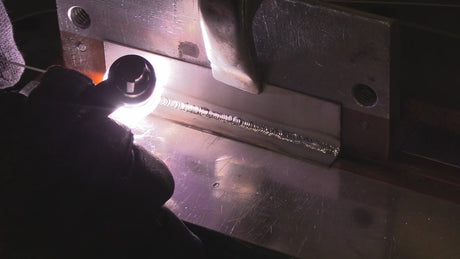
- Use chill blocks (copper or aluminum) clamped tight and close to the weld bead to draw heat away
- Make plenty of tack welds before running your full bead to anchor the part
- Sequence your welds and skip around: weld opposite sides first to balance distortion